Draft and Build Case Study: Five Files Read, One Spec Drafted, Setups Written for Five Platforms
Most repositories already say what they need. A .python-version file names the Python, requirements.txt the packages, a compose file the databases the developers run, .env.example the variables. What they don’t have is that knowledge in the form an agent platform reads, once for each platform.
In the Alpha demo, orders-api is a small Python service with no setup files for any agent. preconfig detect reads the files it has and drafts preconfig.yaml. preconfig build then writes the setup files for five platforms. The draft turned out to be the spec the team had written by hand, line for line apart from its comments.
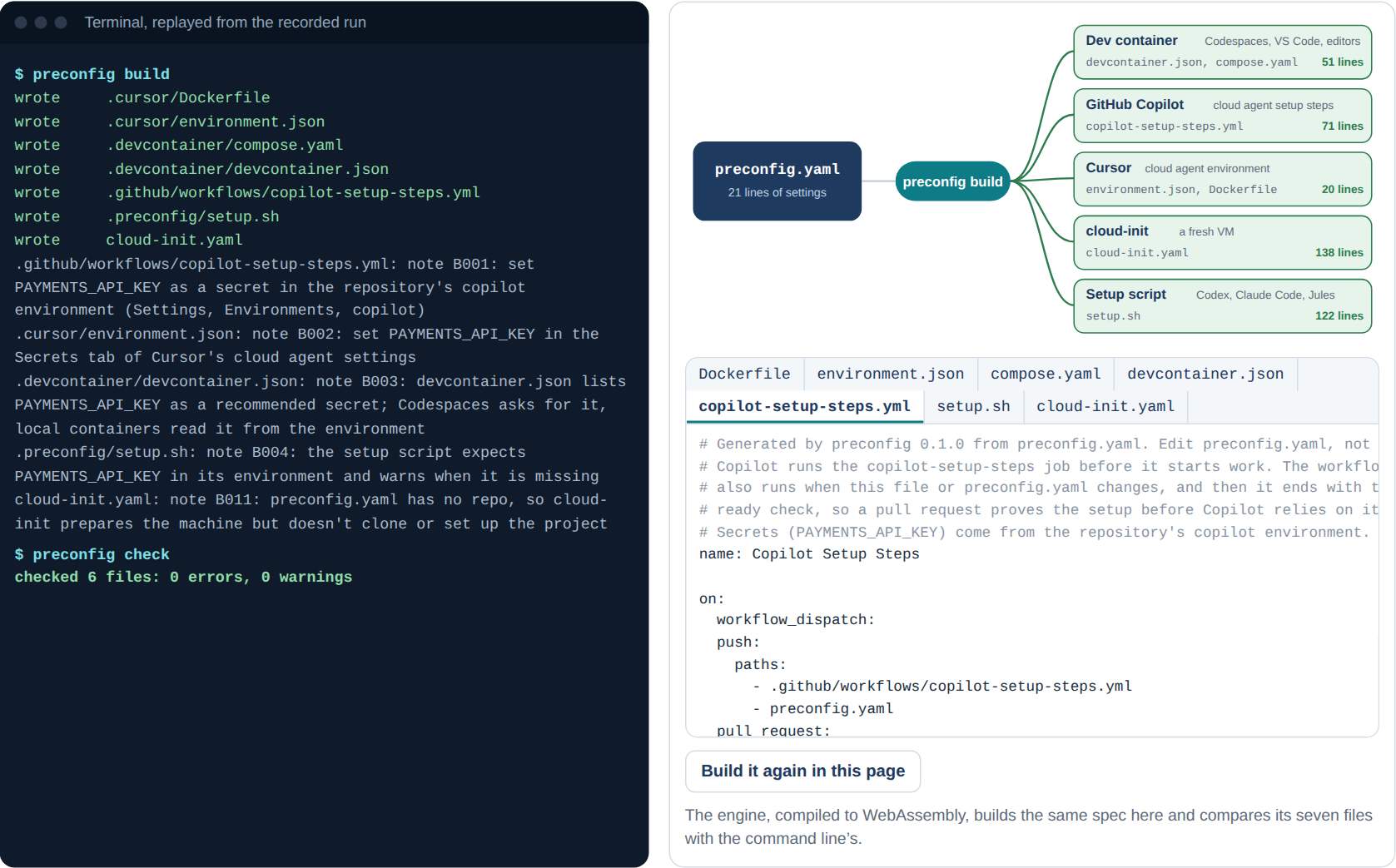
The build as recorded: one spec, seven files, five platforms.
The Set-Up
| orders-api | |
|---|---|
| The service | Orders stored in PostgreSQL, per-customer counts cached in Redis, and four tests that need both |
| What it had | .python-version, pyproject.toml, requirements.txt, a compose.yaml with PostgreSQL 16 and Redis 7, an .env.example, a README, the code and the tests |
| What it lacked | A setup file for any agent platform |
| The commands | preconfig detect, preconfig detect --write, preconfig build, preconfig check |
What Happened
Step 1: detect. detect read five of the repository’s files and ran nothing. Comments in its draft name the file each part came from:
runtimes:
  python: "3.12"  # .python-version

services:
  postgres:   # compose.yaml (service db)
    version: "16"
    user: orders
    password: orders
    database: orders
  redis: "7"  # compose.yaml (service cache)

env:
  DATABASE_URL: postgres://orders:orders@localhost:5432/orders  # .env.example
  REDIS_URL: redis://localhost:6379/0                           # .env.example

secrets:
  - PAYMENTS_API_KEY  # .env.example; the name looks like a secret
The PostgreSQL user, password and database came from the compose file’s environment. PAYMENTS_API_KEY had no value in .env.example, and its name looks like a secret, so detect put it under secrets rather than env. The setup commands came from requirements.txt, and the ready check from pytest being among the requirements. The README, the code and the tests were left alone.
Step 2: a person reads the draft. A draft is a guess from files, and it says so on its first line. Here it matched the spec written by hand: loaded, the two specs are the same, and built, they give the same seven files byte for byte.
Step 3: build. preconfig build wrote the files:
wrote     .cursor/Dockerfile
wrote     .cursor/environment.json
wrote     .devcontainer/compose.yaml
wrote     .devcontainer/devcontainer.json
wrote     .github/workflows/copilot-setup-steps.yml
wrote     .preconfig/setup.sh
wrote     cloud-init.yaml
It added a note for each place the secret has to be set, since no file carries its value: the repository’s copilot environment for Copilot, the Secrets tab of Cursor’s cloud agent settings, and so on. A note also said that without a repo in the spec, cloud-init prepares the machine but doesn’t clone the project.
Step 4: check. A check right after the build found nothing to fix: checked 6 files: 0 errors, 0 warnings.
What Build Wrote
| Platform | Files | Lines | What is in them |
|---|---|---|---|
| Dev container | devcontainer.json, compose.yaml | 51 | The Ubuntu 24.04 base image, Python 3.12 as a feature, PostgreSQL 16 and Redis 7 beside the container on its localhost, the environment, the secret by name, the setup commands |
| GitHub Copilot | copilot-setup-steps.yml | 71 | The job Copilot runs, PostgreSQL and Redis as service containers with health checks, setup-python with a pip cache, the setup commands, and pytest when the workflow runs on its own |
| Cursor | environment.json, Dockerfile | 20 | A Dockerfile that runs the setup script’s machine step, and install and start commands for the project and the services |
| cloud-init | cloud-init.yaml | 138 | The setup script, written to a new server and run at first boot |
| Setup script | setup.sh | 122 | The four steps, machine, services, project and ready, each printing a marker |
The Numbers
| Result | |
|---|---|
| Files detect read | 5 of the repository’s 9 |
| Lines of settings in the spec | 21 |
| Files written | 7, for 5 platforms, 402 lines in all |
| Findings after the build | 0 |
| The draft against the hand-written spec | The same spec, and the same seven files byte for byte |
| Time for detect / build / check, not counting program start | About 0.05 / 0.2 / 0.4 ms |
What the Alpha Revealed: A Draft Is Only as Good as the Repository
detect got orders-api right because orders-api says what it needs in the usual places. Many repositories don’t: the Python version lives only in a CI file, the database only in a README, the test command only in someone’s head. detect notes what it couldn’t tell at the end of the draft, such as a Python version nobody pinned, and picks a default it names. The Beta runs detect on 100 public repositories and compares each draft with a spec reviewed by a person, to measure how often a draft is right.
Next: The Platforms Themselves
The seven files pass each platform’s schema and tools, and the setup script ran on a clean machine. What hasn’t happened yet is Copilot, Cursor and Codespaces running them. In the Beta, each target runs on its own platform for 20 real repositories. The roadmap has the plan.
Try It Yourself
Open the live demo and press Play. Steps 1 and 2 are this case study, as recorded. In step 2, press “Build it again in this page”: the engine in your browser builds the same spec and compares its seven files with the command line’s. Then, in the first panel under the replay, change the Python version or add a service, and watch the files change.