Clean Machine Case Study: Ready in 49.6 Seconds, and a Missing Redis Caught at the Ready Step
A setup file that looks right proves nothing. The only proof is a machine that starts empty, runs the setup, and then passes the project’s own tests. That is what an agent’s cloud machine does every time a session starts, and when the setup is wrong, the agent finds out in the middle of its task, if at all. GitHub’s documentation says that when a setup step fails, Copilot skips the remaining steps and begins working with the machine as it is.
preconfig verify runs that proof before any agent does. In the Alpha demo it ran the orders-api setup on a clean Ubuntu 24.04 container, and again with Redis left out of the spec. The first run was READY. The second set everything up without an error and then failed at the ready step, with the test runner’s own message.
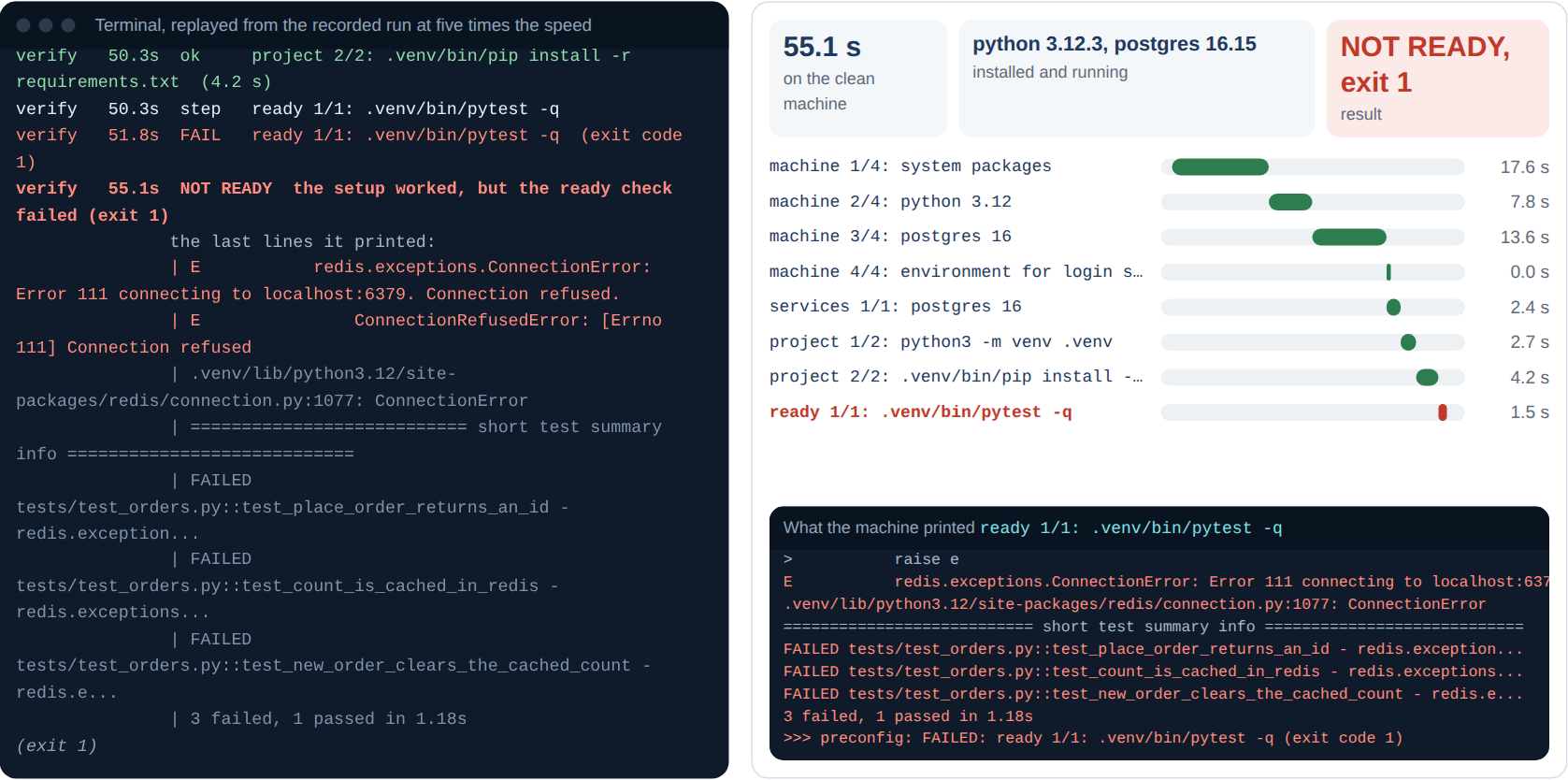
The second run as recorded: the setup works, the tests don’t, and verify says which step broke.
The Set-Up
| Clean machine | |
|---|---|
| The machine | A fresh ubuntu:24.04 container on a Linux machine with two CPUs and Docker |
| The repository | orders-api: orders in PostgreSQL, counts cached in Redis, four tests |
| Run 1 | The full spec: Python 3.12, PostgreSQL 16, Redis 7 |
| Run 2 | The same spec with Redis left out, as someone might trim a spec they think has too much in it |
| The command | preconfig verify --network host --ca-file proxy-ca.crt, because the test machine reaches the internet through a proxy that inspects TLS |
What Happened
Run 1: the full spec. verify started the container, copied the repository in and ran the generated setup script, then the tests. Each step printed a marker, and verify timed each one:
verify    0.0s  start  orders-api: python 3.12, postgres 16, redis 7, on a clean ubuntu:24.04
verify   15.6s  ok     machine 1/5: system packages  (14.8 s)
verify   22.4s  ok     machine 2/5: python 3.12  (6.8 s)
verify   32.3s  ok     machine 3/5: postgres 16  (9.9 s)
verify   35.9s  ok     machine 4/5: redis 7  (3.6 s)
verify   36.0s  have   python 3.12.3, postgres 16.15, redis 7.0.15
verify   38.5s  ok     services 1/2: postgres 16  (2.6 s)
verify   38.6s  warn   PAYMENTS_API_KEY is not set
verify   45.5s  ok     project 2/2: .venv/bin/pip install -r requirements.txt  (4.0 s)
verify   46.0s  ok     ready 1/1: .venv/bin/pytest -q  (0.5 s)
verify   49.6s  READY  4 passed in 0.25s; 10 steps
The warning is the secret: the spec names PAYMENTS_API_KEY, the machine running verify didn’t have it, and the setup said so without stopping. The tests don’t need it.
Run 2: no Redis. preconfig warned before it started anything:
preconfig.yaml:16:14: warning S062: REDIS_URL points at Redis on this machine, but services doesn't list redis
    Add redis under services, or point REDIS_URL somewhere else.
A warning doesn’t stop verify, so it went on. Every setup step passed. Then the tests ran against a Redis that nothing had started:
verify   51.8s  FAIL   ready 1/1: .venv/bin/pytest -q  (exit code 1)
verify   55.1s  NOT READY  the setup worked, but the ready check failed (exit 1)
               the last lines it printed:
               | E           redis.exceptions.ConnectionError: Error 111 connecting to localhost:6379. Connection refused.
               | E               ConnectionRefusedError: [Errno 111] Connection refused
               | .venv/lib/python3.12/site-packages/redis/connection.py:1077: ConnectionError
               | =========================== short test summary info ============================
               | FAILED tests/test_orders.py::test_place_order_returns_an_id - redis.exception...
               | FAILED tests/test_orders.py::test_count_is_cached_in_redis - redis.exceptions...
               | FAILED tests/test_orders.py::test_new_order_clears_the_cached_count - redis.e...
               | 3 failed, 1 passed in 1.18s
The test that passed checks that a negative total is refused, which never reaches Redis. verify picked pytest’s own error lines out of the 472 lines the tests printed and exited with 1: the setup worked, the ready check didn’t. A failed install step would have exited with 2 and named that step instead.
Three Runs Each
| Run | Result | Time | Detail |
|---|---|---|---|
| Full spec, 1 | READY | 49.6 s | Python 3.12.3, PostgreSQL 16.15, Redis 7.0.15; 4 tests passed |
| Full spec, 2 | READY | 68.7 s | The same |
| Full spec, 3 | READY | 73.0 s | The same |
| No Redis, 1 | NOT READY, exit 1 | 55.1 s | Failed at the ready step; 3 tests failed on a refused Redis connection, 1 passed |
| No Redis, 2 | NOT READY, exit 1 | 64.4 s | The same |
| No Redis, 3 | NOT READY, exit 1 | 71.0 s | The same |
The Numbers
| Run 1 | Run 2 | |
|---|---|---|
| Steps | 10 | 8 |
| System packages | 14.8 s | 17.6 s |
| Runtimes and services installed | 20.3 s | 21.4 s |
| Services started | 2.6 s | 2.4 s |
| Project setup | 6.9 s | 6.9 s |
| Ready check | 0.5 s, passed | 1.5 s, failed |
| Total, container removal included | 49.6 s | 55.1 s |
| verify’s exit code | 0 | 1 |
Most of the spread between runs is downloads: the system packages step alone took 14.8 to 24.0 seconds across the six runs.
What the Alpha Revealed: A Warning Is Easy to Miss
preconfig saw the missing Redis before anything ran: REDIS_URL points at localhost and no service listed provides it. But a warning scrolls past, and a spec with warnings still builds. The run that followed took 55 seconds to show what the warning meant. The Alpha keeps both, the cheap warning and the expensive proof, and the Beta looks at making the checks on a pull request stricter than the ones on a developer’s desk, so a warning like this one can stop a merge.
Next: The Same Proof on Every Pull Request
verify ran on one machine, and only the Python, PostgreSQL 16 and Redis 7 install paths could run on its network. In the Beta, verify runs every install path the spec offers, on an open network and behind a company proxy, and a GitHub Action runs it when a pull request changes the spec. The roadmap has the plan.
Try It Yourself
Open the live demo and press Play, or jump to step 4. Steps 4 and 5 are these two runs, replayed five times faster, with a bar for each step and the machine’s own output underneath. Then, in the first panel under the replay, pick orders-api and delete the redis line: the warning appears as you type.